Custom Collation
Overview
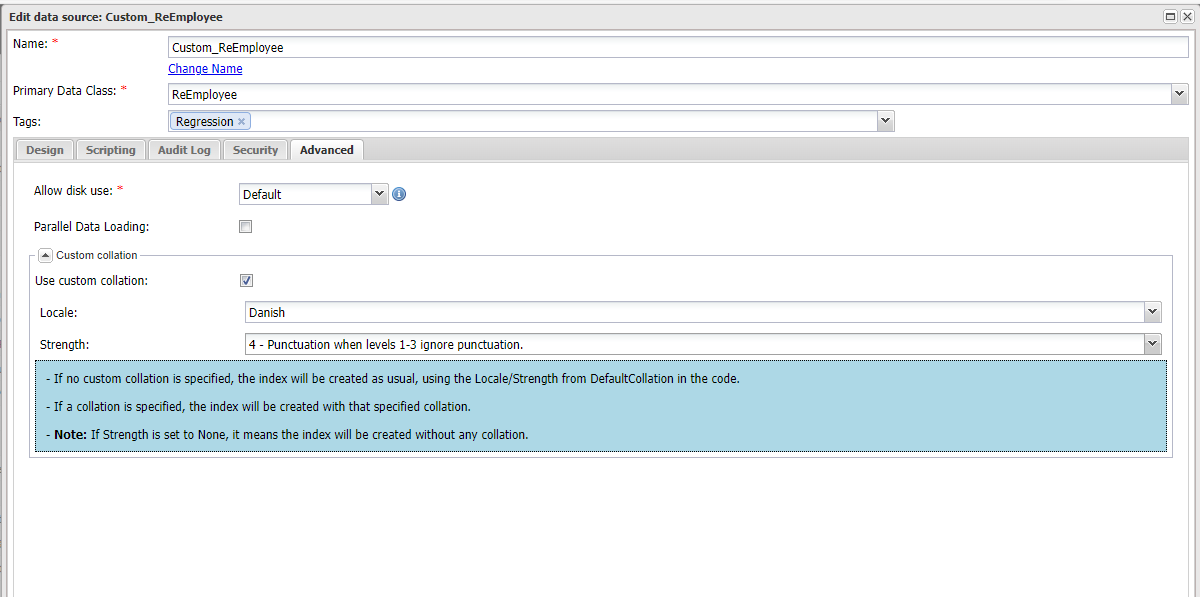
Use custom collation to specify language-specific rules for string comparison, such as rules for letter case and accent marks in your data source.
Access and Setup
To configure custom collation for a data source:
Navigate to the Data Sources.
In the data source editor, go to the Advanced settings tab.
Locate the Custom Collation section to adjust collation settings.
Configuration Details
Enabling Custom Collation
- Use Custom Collation: Check this option to enable and customize collation settings specific to this data source.
Locale
- Locale: Choose the appropriate locale that matches the language and regional standards for which the data is intended. This setting determines the basic rules for character comparison.
- None: No locale-aware collation is applied; string comparison falls back to the deployment's default (binary) collation.
Strength Levels
Customize how intensively the text data is compared and sorted by selecting a strength level:
0 - None:
- Function: No collation is applied, utilizing default system behaviors.
- Ideal for: Situations where standard sorting is adequate without additional considerations.
1 - Comparisons of the base characters only (Primary):
- Function: Compares only the base characters, disregarding other differences like diacritics or case.
- Ideal for: Basic alphabetical sorting where accents and case are not differentiated.
2 - Comparisons up to secondary differences, such as diacritics (Secondary):
Function: Adds diacritic sensitivity to comparisons, considering accented characters as distinct.
Ideal for: Languages where accents modify the character’s meaning, enhancing sorting accuracy.
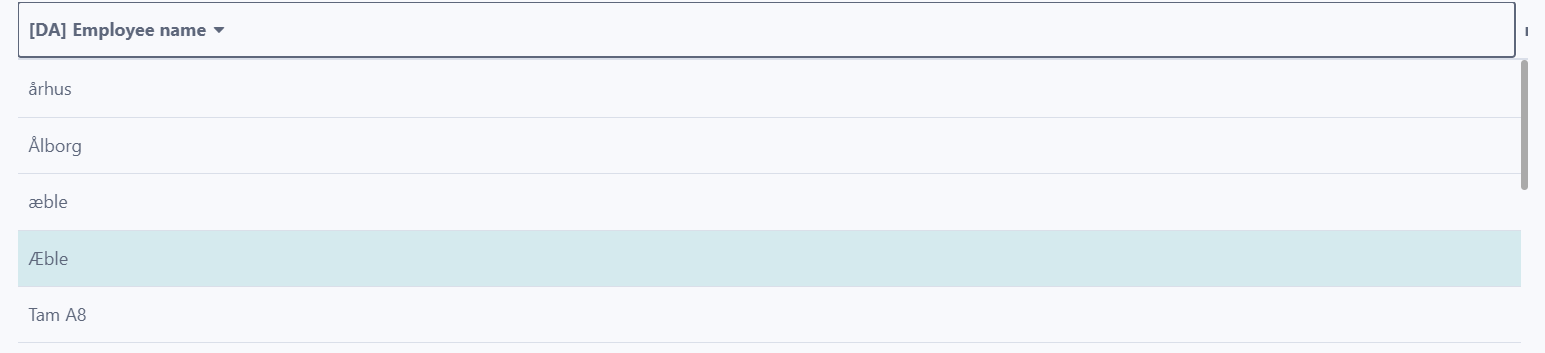
3 - Comparisons up to tertiary differences, such as case and letter variants (Tertiary):
- Function: Includes case and letter variant differences in comparisons.
- Ideal for: Ensuring case sensitivity in sorting, which can be critical in certain contexts like proper noun identification.
4 - Punctuation when levels 1-3 ignore punctuation (Quaternary):
- Function: Considers punctuation differences only when all other levels (primary to tertiary) are identical.
- Ideal for: Detailed sorting where punctuation can influence data order and meaning, such as in programming code or legal documents.
5 - Specific use case of tie breaker (Identical):
- Function: Utilizes very fine distinctions, such as invisible characters and spaces, as a tiebreaker in comparisons.
- Ideal for: Highly sensitive data environments where minute differences are crucial, often in legal or formal documents.
Conclusion
Configuring custom collation allows for enhanced flexibility and accuracy in data handling.
Information!
- Make sure to support the index with the same custom collation as the data source for optimizing query performance.
- The greater the Strength Level, the slower the query performance.