Component: Performance Report
Introduction
Every product has different requirements for creating a Service Level Agreement (SLA) report. It helps to monitor the system during operation. There are many types of SLA report, depending on their purpose. This component focuses on creating an SLA report based on response time. It is built:
- To create the SLA report periodically
- To deliver it automatically
An SLA report of the response time is based on the following information:
- A list of transaction types to measure, where each transaction type can contain one or more endpoints
- A response time threshold for each transaction type
- The operation time duration in a day
- A percentile (such as 95%) to determine whether a measurement passes or fails
Features
The component includes two main parts. One is a plugin used to connect to the database and calculate the measurements for the transaction types. The other is a page to manage SLA report definitions. Each definition includes two sections: report settings and delivery settings.
Manage SLA report definitions
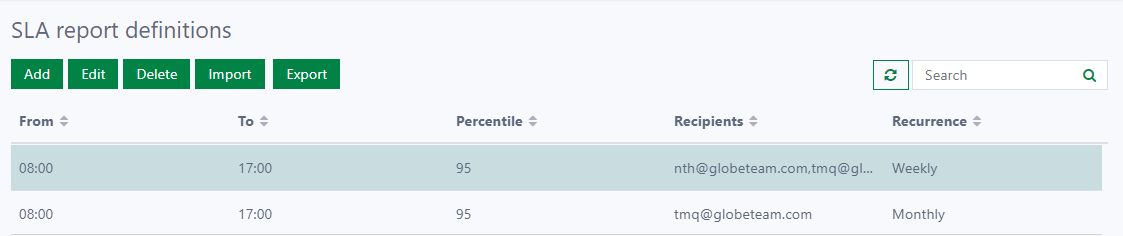
This provides a list of the SLA report definitions with basic operations such as Create, Edit, Delete, Import, and Export, as shown below. For each report definition, you can view basic information such as:
- The operation time duration required for the transaction types
- The percentile of measurements
- Who will receive the SLA report
- The recurrence on which the report is run and delivered automatically
To create a new report definition, the following information must be provided.
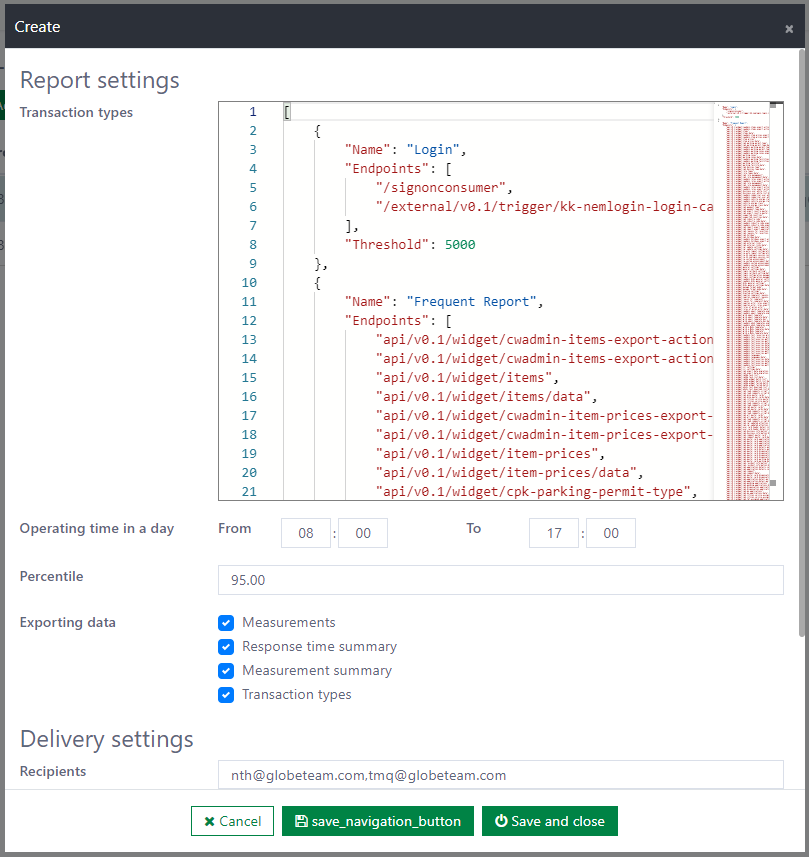
Report settings
These define what needs to be measured to evaluate operational efficiency. They include:
- Transaction types (Required): Determine the list of transaction types covered by the SLA report. Each transaction type has a name, a list of endpoints, and a response time threshold.
- Operating time in a day (Required): Determine a duration within a day, so that only the endpoints that occurred during that duration are collected when calculating measurements.
- Percentile (Required): Determine the percentile value to use.
- Exporting data (Required): Determine which data is included in the SLA report.
Delivery settings
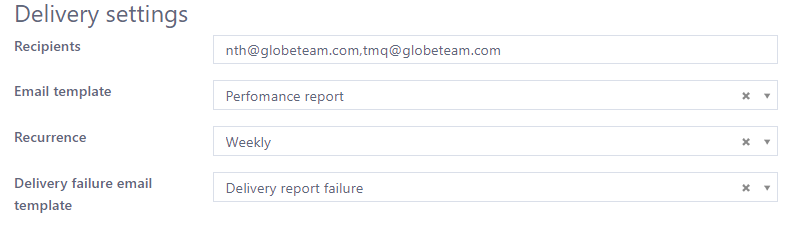
These define who will receive the SLA report when it is created periodically. They include:
- Recipients (Required): Determine who will receive the report, even when generating it fails.
- Email template (Required): Determine which email template is used when the report is generated successfully.
- Recurrence (Required): Determine the interval (weekly/monthly) on which the report is run as planned.
- Delivery failure email template (Required): Determine which email template is used when the report fails to generate.
You can change the settings by editing an existing definition. You can also export a list of SLA report definitions to a JSON file and share it with someone, or import definitions from a given JSON file.
Connect to a database
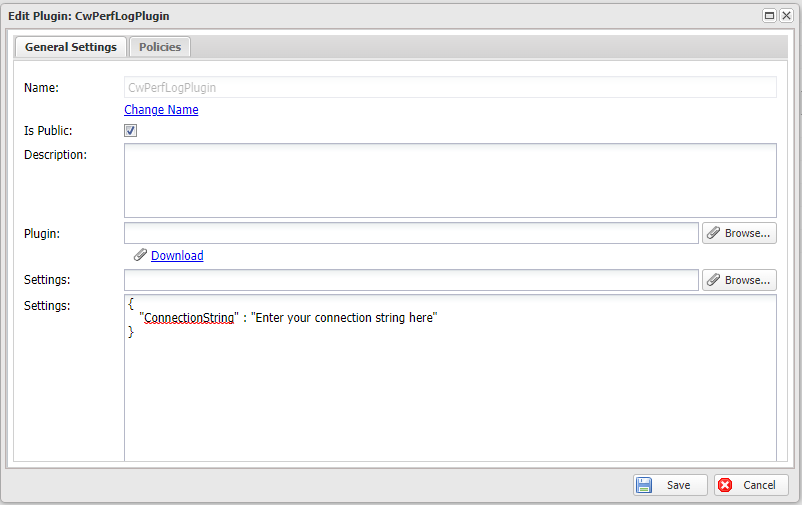
The SLA report is calculated based on the data from the database. You need to change the settings of the CwPerfLogPlugin plugin so that it can connect to the proper database.
Limitations
- For each Casewhere instance, the component can only create SLA reports against a single database at a time. This means you cannot create SLA reports across multiple databases.
- Generating an SLA report is retried 3 times before a failure email is sent to the recipient. The admin can manually retry it via the workflow monitor.
Dependencies
It depends on the following components:
- Casewhere Mail
Installation
Requirements
- Casewhere 2.6.10 or later
Configuration
- Import two products: Casewhere PerfLog Plugin and Casewhere Performance Report
- Create the SLA report definition that follows the customer's requirements
- Change the plugin setting to connect to the database
Releases
1.0.0 - 03/17/2022
Changelog
Download (login required): [TBD]