Event trigger
Introduction
The Event Trigger feature enables applications and components to subscribe to built-in events and trigger workflows. For instance, a Casewhere application can subscribe to the "User Authorizing" event to execute additional authorization logic, determining whether to accept or reject the request.
Additionally, Casewhere applications or components can emit custom events within a workflow, allowing other applications or components to subscribe or intercept these events to handle their own business processes.
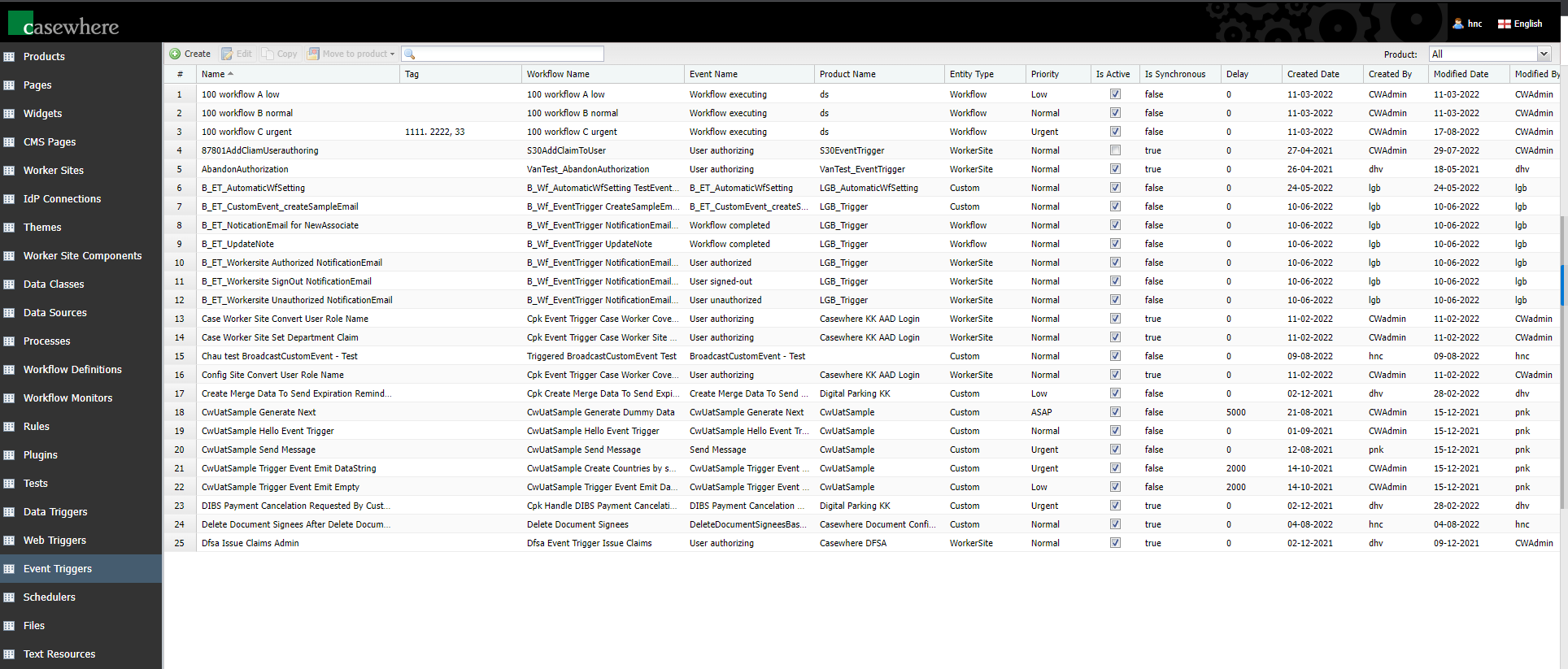
In Casewhere Admin, navigate to Event Triggers. From here, you can create, edit and manage event triggers like any product resource.
Configuration
The following details are necessary to configure an event trigger:
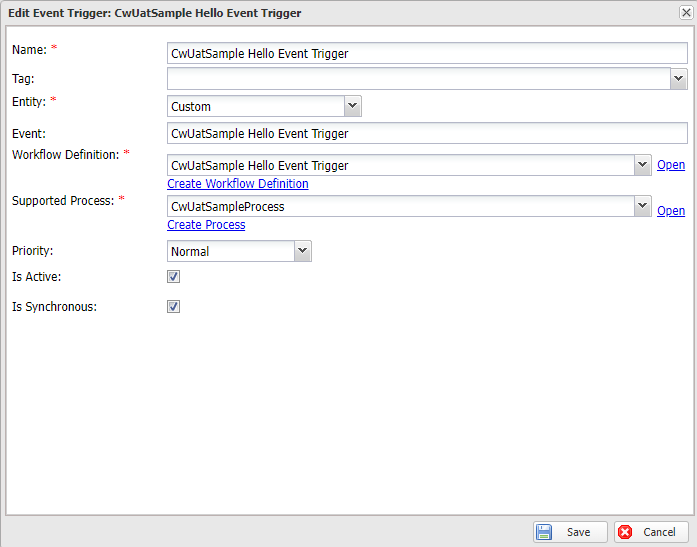
Name: Name must be required and unique.
Entity: There are 3 main entities: Worker Site, Workflow, and Custom. It's possible to subscribe to a custom event emitted from a workflow. The event name must be provided.
Event: Select a built-in event or enter the custom event name.
Workflow: The workflow triggered when the event emitted. Casewhere only accepts automatic, case-creation workflow definitions for using with event triggers. To access the event's data, the workflow definition must also accept input.
Process: The process in which the triggered workflow will run. A new case is created every time Casewhere executes an event trigger.
Priority: When an event happens, triggers will run in the order Urgent > As Soon As Possible > Normal > Low.
Is Active: Inactive event triggers will not be executed.
Is Synchronous: To determine whether Casewhere should execute the workflow immediately in the current context or if the workflow should be queued. You can also choose how long the workflow should be delayed.
Built-in events
Worker site
User authorizing
The event is emitted when Casewhere starts authorizing users after they login. It is possible to intercept the authorization flow here with your custom logic to accept or reject the user session accordingly.
Event data:
| Property name | Property type | Description |
|---|---|---|
| EventName | string |
"User authorizing" |
| WorkerDomainName | string |
The domain name of the worker site |
| WorkerSiteId | Guid |
The id of the worker site |
| Username | string |
The Username claim |
| SPIDPSessionID | Guid |
The session id to be used with IdentityApi |
| UserId | string |
The UserId claim |
User authorized
The event is emitted after Casewhere authorizes a user login session. It's possible to subscribe to this event and enrich the user session with additional claims.
Event data:
| Property name | Property type | Description |
|---|---|---|
| EventName | string |
"User authorized" |
| WorkerDomainName | string |
The domain name of the worker site |
| WorkerSiteId | Guid |
The id of the worker site |
| Username | string |
The Username claim |
| UserSessionId | Guid |
The user session id managed by Casewhere |
| UserId | string |
The UserId claim |
User sign-out
The event is emitted when users log out.
Event data:
| Property name | Property type | Description |
|---|---|---|
| EventName | string |
"User signed-out" |
| WorkerDomainName | string |
The domain name of the worker site |
| WorkerSiteId | Guid |
The id of the worker site |
| Username | string |
The Username claim |
| UserSessionId | Guid |
The user session id managed by Casewhere |
| UserId | string |
The UserId claim |
User unauthorized
The event is emitted when Casewhere rejects a request due to the user's insufficient permission.
Event data:
| Property name | Property type | Description |
|---|---|---|
| EventName | string |
"User unauthorized" |
| WorkerDomainName | string |
The domain name of the worker site |
| WorkerSiteId | Guid |
The id of the worker site |
| Username | string |
The Username claim |
| UserSessionId | Guid |
The user session id managed by Casewhere |
| UserId | string |
The UserId claim |
Workflow
Workflow executing
The event is emitted right before Casewhere executes a workflow.
Event data:
| Property name | Property type | Description |
|---|---|---|
| EventName | string |
"Workflow executing" |
| CaseId | Guid |
The id of the case in which the workflow is executed |
| WorkflowId | Guid |
The id of the workflow |
| WorkflowDefinitionId | Guid |
The id of the workflow definition |
| WorkflowName | string |
The name of the workflow |
| ActivityId | Guid? |
The id of the activity that triggers the workflow |
| Input | IList<string> |
The list of data object ids as workflow input |
Workflow executed
The event is emitted right after Casewhere executes a workflow.
Event data:
| Property name | Property type | Description |
|---|---|---|
| EventName | string |
"Workflow executed" |
| CaseId | Guid |
The id of the case in which the workflow is executed |
| WorkflowId | Guid |
The id of the workflow |
| WorkflowDefinitionId | Guid |
The id of the workflow definition |
| WorkflowName | string |
The name of the workflow |
| Input | IList<string> |
The list of data object ids as workflow input |
Workflow completed
The event is emitted when Casewhere completes a workflow. A workflow is completed when all required activities are completed. Read more here.
Event data:
| Property name | Property type | Description |
|---|---|---|
| EventName | string |
"Workflow completed" |
| CaseId | Guid |
The id of the case in which the workflow is executed |
| WorkflowId | Guid |
The id of the workflow |
| WorkflowDefinitionId | Guid |
The id of the workflow definition |
| WorkflowName | string |
The name of the workflow |
| Input | IList<string> |
The list of data object ids as workflow input |
Emit custom events
You can emit a custom event from a workflow Scripted Activity using ctx.Emit.
ctx.Emit("A custom event", new
{
	TextData = "data",
	NumericData = 2,
	BooleanData = true
});
Please note that the event is sent to the event queue only if the Scripted Activity completes without errors. If the activity crashes, Casewhere will reject all events created during its execution. To ensure that events are sent to the queue regardless of the activity's status, you can use ctx.ForceEmit, available since version 2.8.
Examples
Learn more about working with event triggers here.