Data objects
Data storage
Casewhere stores information in data objects, each constructed by a set of data attributes that follow the definition in the corresponding data class.
The screenshot below illustrates how a data class is configured in Casewhere:
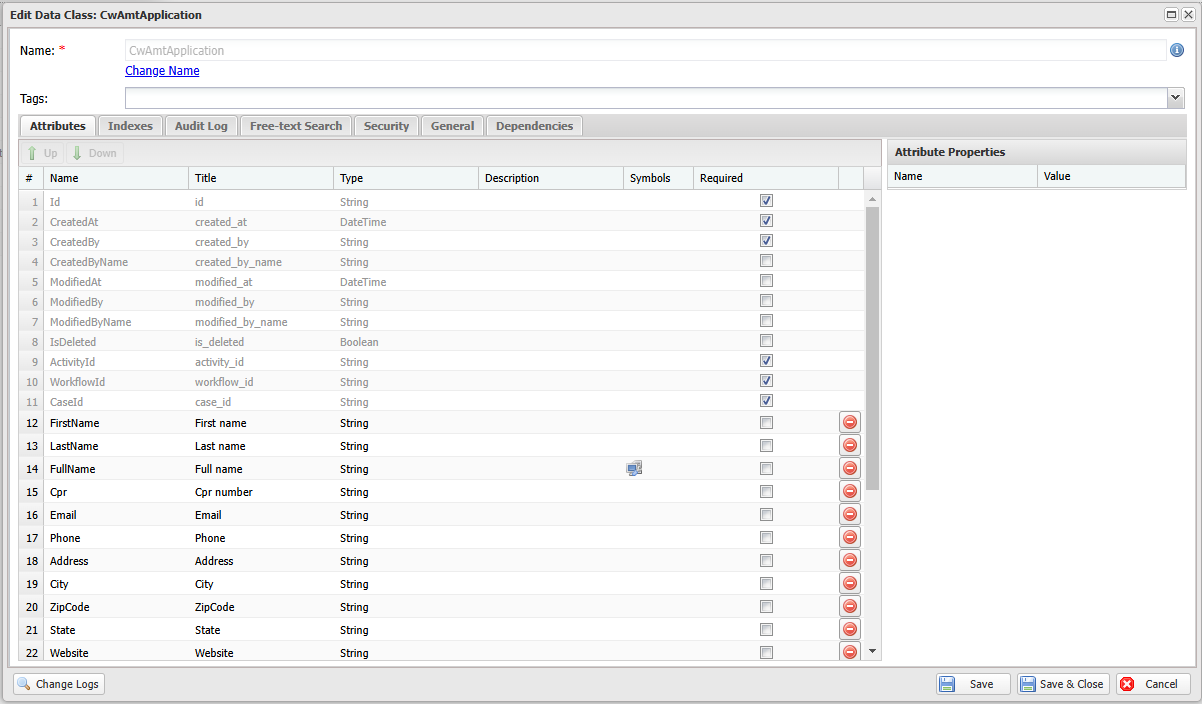
Each data object is represented by a MongoDB document:
{
    "_id" : "CwAmtApplication/eebf8351-adc8-4b33-be3f-b1f6009dff03",
    "IsDeleted" : false,
    "CreatedAt" : ISODate("2024-09-25T09:35:14.779+0000"),
    "CreatedBy" : "CWRuntime",
    "CreatedByName" : "CWRuntime",
    "Version" : NumberInt(1),
    "ModifiedAt" : ISODate("2024-09-25T09:35:15.741+0000"),
    "ModifiedBy" : "CWRuntime",
    "ModifiedByName" : "CWRuntime",
    "ActivityId" : CSUUID("257A1B62-62A8-47FE-AE69-B1F6009DFED2"),
    "WorkflowId" : CSUUID("A39DAA11-7FAC-429A-A6D3-B1F6009DFED1"),
    "CaseId" : CSUUID("BC4271BE-9199-4BAD-AB14-B1F6009DFED1"),
    "FirstName" : "Amber",
    "LastName" : "Steuber",
    "FullName" : "Amber Steuber",
    "Email" : "Amber.Steuber@hotmail.com",
    "ApplicationAmount" : 2248.98,
    "Status" : "Approved",
    "SubmittedDate" : ISODate("2021-06-16T13:03:44.764+0000"),
    "ApplicationID" : "0000251",
    "CaseState" : "Created"
}
Internally, Casewhere is event-sourced: every change to a data object is recorded as an event and then denormalized into the read-model document shown above, which is what queries read. This is why hard-deleting an object also removes its underlying events.
Data attributes
There are two main types of data attributes:
System-managed attributes — automatically set by Casewhere:
Attribute Description Id Unique string in the format {DataClass}/{Guid}, e.g.Application/ff87b1a8-fa67-4fbf-a0b7-8b7f07d63670CreatedAt UTC timestamp when the data object was created CreatedBy Identifier of the user who created the data object (determined by IdP Connection claim mapping) CreatedByName Display name of the user who created the data object ModifiedAt UTC timestamp of the last update ModifiedBy Identifier of the last user who updated the data object ModifiedByName Display name of the last user who updated the data object IsDeleted Whether the data object has been soft-deleted ActivityId ID of the workflow activity that created the data object WorkflowId ID of the workflow that created the data object CaseId ID of the case to which the data object belongs Version Integer that increments on each update to the data object CaseState State of the case to which the data object belongs (e.g. Draft,Created)Custom attributes — defined by your solution. See the complete list of attribute types.
Create and update data objects
All data objects in Casewhere must be created through a workflow, either via a form activity or a scripted activity.
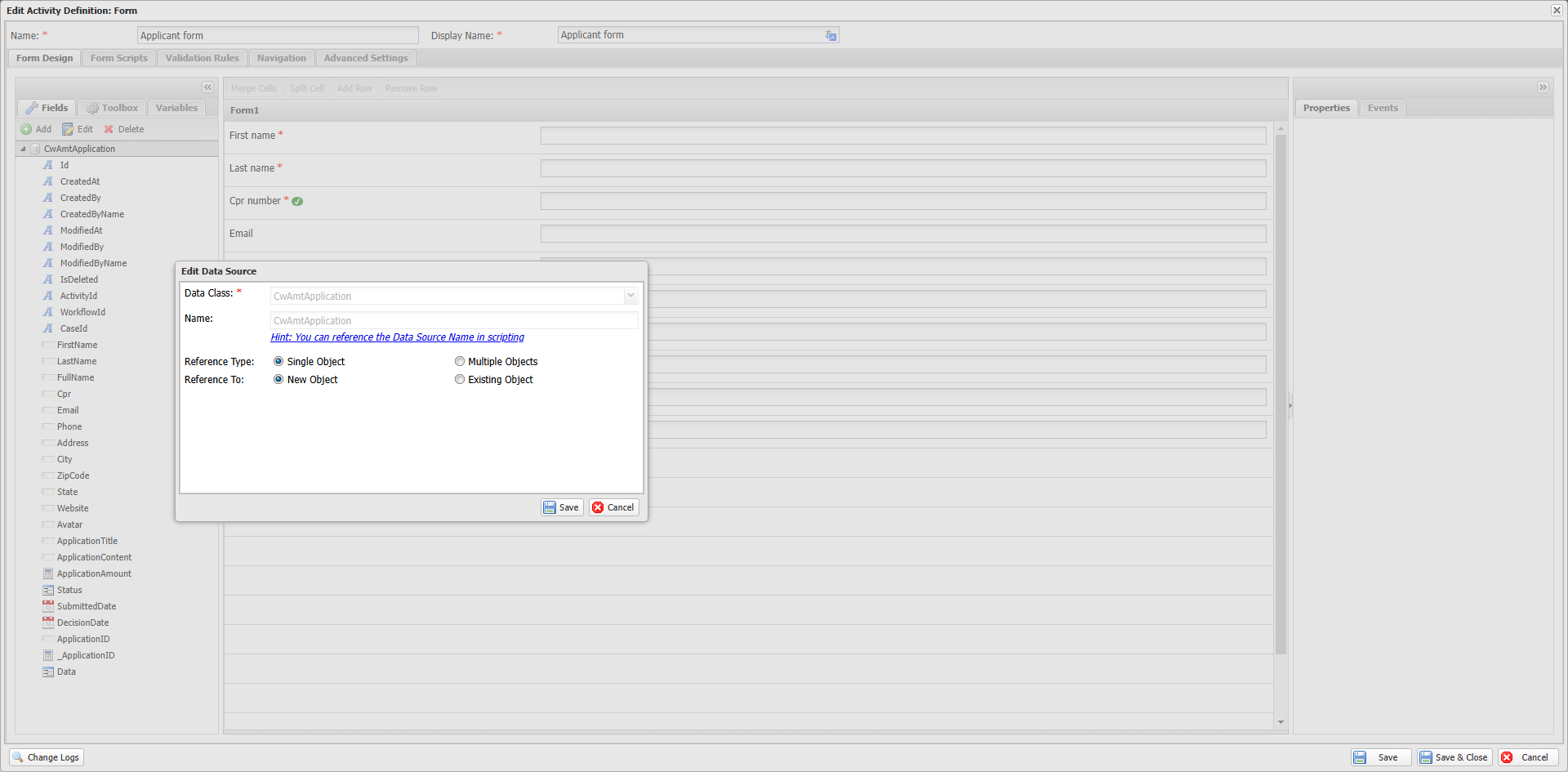
Form Activity: When end-users submit data through a form, Casewhere creates or updates data objects for the associated data class configured in the form's data source, provided that all data validations pass. Learn more about form activity.
Scripted Activity: Create and update data objects by executing C# scripts using the IDataApi. Learn more about scripted activity.

Add a data object
var dataApi = ctx.Use<IDataApi>();
var orderId = dataApi.Add("Order", new
{
    OrderNo = 100,
    Customer = "Jane",
    Total = 15.5
});
You can optionally specify a target case (the caseId parameter is of type Guid?):
var orderId = dataApi.Add("Order", new { OrderNo = 100 }, caseId: targetCaseId);
Note: Most mutation methods (Add, Update, Delete, Clone, Copy, etc.) accept an optional
bool notifyChange = trueparameter. Set it tofalseto suppress data-change notifications when needed.
Update a data object
var dataApi = ctx.Use<IDataApi>();
dataApi.Update(orderId, new
{
    Total = 20,
    BillingAddress = "123 Sunset Blvd"
});
Update many data objects
Update multiple data objects at once by IDs, by query, or by enumeration:
var dataApi = ctx.Use<IDataApi>();

// By IDs
dataApi.UpdateMany(new string[] { "doId1", "doId2" }, new { Status = "Closed" });

// By query
var filter = FilterBuilder.Create().Eq("DepartmentId", ctx.Input.Id).Eq("Active", true).Build();
var query = DataObjectApiQuery.For("Employee").FilterBy(filter);
dataApi.UpdateMany(query, new { Active = false });

// By enumeration (for large collections)
var enumQuery = DataEnumerationQuery.For("Employee").FilterBy(filter);
dataApi.UpdateMany(enumQuery, new { Active = false });
Clone a data object
Create a copy of an existing data object. Optionally ignore specific properties and specify a target case:
var dataApi = ctx.Use<IDataApi>();
var clonedId = dataApi.Clone(id, ignoreProperties: new[] { "Status", "CreatedDate" });

// Clone into a different case
var clonedId2 = dataApi.Clone(id, caseId: targetCaseId, ignoreProperties: new[] { "Status" });
Copy data between data objects
Copy data from one data object to another. Only attributes that exist in both data classes are copied:
var dataApi = ctx.Use<IDataApi>();
dataApi.Copy(srcId, destId, ignoreProperties: new[] { "Status" });
Increment a numeric attribute
Atomically increment a numeric attribute value. The value parameter accepts any numeric type (int, long, double, decimal). This is thread-safe:
var dataApi = ctx.Use<IDataApi>();
dataApi.Inc(customerId, "AvailableBalance", 10000);
Manipulate array attributes
Push and pull items from array attributes. These operations are thread-safe:
var dataApi = ctx.Use<IDataApi>();

// Push items to an array
dataApi.Push(id, "Categories", "item1", "item2");

// Pull items from an array
dataApi.Pull(id, "Categories", "item1");
Move a data object to another case
The caseId parameter is of type Guid:
var dataApi = ctx.Use<IDataApi>();
dataApi.MoveToCase(dataObjectId, targetCaseId);
Change the creator of a data object
var dataApi = ctx.Use<IDataApi>();
dataApi.ChangeCreator(dataObjectId, "newUserName");
Delete data objects
Casewhere supports soft deletion and hard deletion.
Soft deletion
The data object is marked as deleted but remains in the database. This is the default method:
var dataApi = ctx.Use<IDataApi>();
dataApi.Delete(ctx.Input.Id);
Delete many data objects
Delete multiple data objects at once by IDs, by query, or by enumeration:
var dataApi = ctx.Use<IDataApi>();

// By IDs
dataApi.DeleteMany(new string[] { "doId1", "doId2" });

// By query
var filter = FilterBuilder.Create().Eq("Status", "Expired").Build();
var query = DataObjectApiQuery.For("Contract").FilterBy(filter);
dataApi.DeleteMany(query);

// By enumeration (for large collections)
var enumQuery = DataEnumerationQuery.For("Contract").FilterBy(filter);
dataApi.DeleteMany(enumQuery);
Hard deletion
Permanently removes data objects and their associated events from the database:
var dataApi = ctx.Use<IDataApi>();
dataApi.HardDelete(customerId1, customerId2);
Note: Hard deletion must be enabled in the Worker API configuration:
<add key="db:EnableHardDelete" value="true" />
Load and search data objects
When loading data through widgets or form activities, Casewhere automatically retrieves data based on your data source configuration. Below are the scripting APIs for manual data access.
Load a single data object
var dataApi = ctx.Use<IDataApi>();

// Load by ID
var application = dataApi.Load(applicationId);

// Force reload from database (bypass cache)
var freshData = dataApi.Load(applicationId, forceReload: true);

// Load from a data source (useful for queries that include related data)
var employee = dataApi.Load("EmployeesWithDepartments", employeeId);
Log.Info("Department: {Dept}", employee["Department"]["Name"]);
Search data objects
var dataApi = ctx.Use<IDataApi>();
var filter = FilterBuilder.Create()
    .Eq("CompanyId", ctx.Input.Id)
    .Eq("Active", true)
    .Build();

var result = dataApi.Search(DataObjectApiQuery
    .For("Employee")
    .FilterBy(filter));

Log.Info("Total: {TotalItems}", result.TotalItems);
foreach (var emp in result.Data)
{
    Log.Info("Employee {Name}", emp.Get<string>("Name"));
}
Search from a data source
var dataApi = ctx.Use<IDataApi>();
var filter = FilterBuilder.Create().Eq("Active", true).Build();
var result = dataApi.Search(DataSourceApiQuery
    .For("EmployeesWithDepartments")
    .FilterBy(filter));

foreach (var emp in result.Data)
    Log.Info("{Name} - {Dept}", emp["Name"], emp["Department"]["Name"]);
Check existence and count
var dataApi = ctx.Use<IDataApi>();
var filter = FilterBuilder.Create().Eq("DepartmentId", deptId).Build();

// Check if any matching data object exists
bool hasEmployees = dataApi.Any("Employee", filter);

// Count matching data objects
long count = dataApi.Count("Employee", filter);
Enumerate large collections
Use Enumerate for iterating through large data sets without loading everything into memory:
var dataApi = ctx.Use<IDataApi>();
var filter = FilterBuilder.Create().Eq("Active", true).Build();
var query = DataEnumerationQuery.For("Employee").FilterBy(filter);

var counter = 0;
foreach (var employee in dataApi.Enumerate(query))
{
    var fullName = employee["FirstName"] + " " + employee["LastName"];
    dataApi.Update(employee["Id"], new { FullName = fullName });

    counter++;
    if (counter % 100 == 0)
        ctx.CommitChanges();
}
You can also enumerate from a data source:
var query = DataSourceEnumerationQuery.For("EmployeeWithCompany")
    .FilterBy(filter);

foreach (var employee in dataApi.Enumerate(query))
{
    Log.Info("Employee: {Name}, Company: {Company}",
        employee["Name"], employee["Company"]["Name"]);
}
Export data to CSV
Stream a data source result set to a CSV file:
var dataApi = ctx.Use<IDataApi>();
var filter = FilterBuilder.Create().Eq("Active", true).Build();
var query = DataSourceEnumerationQuery.For("EmployeeWithCompany")
    .FilterBy(filter)
    .ProjectOn("Name", "Company");

var csvPath = dataApi.DumpToCsv(query);
Log.Info("CSV exported to {path}", csvPath);
Advanced query options
DataObjectApiQuery and DataEnumerationQuery support additional options for performance tuning:
var query = DataObjectApiQuery.For("Application")
    .FilterBy(filter)
    .OrderBy("SubmittedDate", true)
    .Paging(skip: 0, take: 50)
    .IncludeTotalItems(true)                        // Include total count in results
    .LimitSearch(1000)                              // Limit the search window
    .WithCustomCollation("da", 2)                   // Custom collation (locale, strength)
    .SetHintIndex("general_Status_SubmittedDate")   // Hint a specific index
    .SetHintIndexForCount("general_Status")         // Hint index for count query
    .SetMaxQueryTimeout(30000);                     // Max query timeout in ms
Data migration
Import data with a specific ID (useful for data migration scenarios). The ID must be in the {DataClass}/{Guid} format:
var dataApi = ctx.Use<IDataApi>();

// Basic migration
dataApi.Migrate("Employee/3f2504e0-4f89-41d3-9a0c-0305e82c3301", new { Name = "Jane" },
    new DslMigrationOption(canUpdateIfExist: true, ignoreEnforceConstraints: true));
Read data objects
The IDataApi returns data objects of type DynamicDataObject, which provides convenient methods for reading data:
Read attributes
var name = dataObject.Get<string>("Name");
var amount = dataObject.Get<double>("Amount");
var isActive = dataObject.Get<bool>("IsActive");
Read array attributes
var skills = dataObject.GetList<string>("Skills");
var ratings = dataObject.GetList<double>("Ratings");
Check attribute existence
// Returns true if the attribute value is neither null nor empty
var hasSkillSet = dataObject.Has("Skills");

// Returns true if the attribute is present, regardless of its value
var exists = dataObject.HasKey("Skills");
Utility methods
Get data class metadata
var dataApi = ctx.Use<IDataApi>();
var dataClass = dataApi.GetDataClass("Employee");
Get data source schema
var dataApi = ctx.Use<IDataApi>();
var schema = dataApi.GetSchema("EmployeeDataSource");
FilterBuilder reference
The FilterBuilder provides a fluent API for constructing MongoDB query filters:
| Method | Description |
|---|---|
Eq(field, value) |
Equal to |
Ne(field, value) |
Not equal to |
Gt(field, value) |
Greater than |
Gte(field, value) |
Greater than or equal to |
Lt(field, value) |
Less than |
Lte(field, value) |
Less than or equal to |
In(field, values) |
Matches any value in the list |
Nin(field, values) |
Does not match any value in the list |
AnyEq(field, value) |
Any element in an array equals the value |
AnyNe(field, value) |
Any element in an array does not equal the value |
AnyGt(field, value) |
Any element in an array is greater than the value |
AnyGte(field, value) |
Any element in an array is greater than or equal to the value |
AnyLt(field, value) |
Any element in an array is less than the value |
AnyLte(field, value) |
Any element in an array is less than or equal to the value |
AnyIn(field, values) |
Any element in an array matches any value in the list |
AnyNin(field, values) |
Any element in an array does not match any value in the list |
And(filters) |
Logical AND of multiple filter conditions |
Or(filters) |
Logical OR of multiple filter conditions |
Text(search) |
Full-text search |
Regex(field, pattern, options) |
Regular expression match |
Exists(field, exists) |
Check if a field exists in the document |
GeoWithin(field, coordinates) |
Geospatial: within a polygon |
GeoWithinBox(field, lowerLeftX, lowerLeftY, upperRightX, upperRightY) |
Geospatial: within a bounding box |
GeoWithinCenter(field, x, y, radius) |
Geospatial: within a circle |
GeoWithinCenterSphere(field, x, y, radius) |
Geospatial: within a sphere |
GeoWithinPolygon(field, points) |
Geospatial: within a polygon defined by points |
Example: Combining filters with And/Or
var filter = FilterBuilder.Create()
    .And(
        FilterBuilder.Create().Eq("Status", "Active").Build(),
        FilterBuilder.Create().Or(
            FilterBuilder.Create().Eq("Department", "Sales").Build(),
            FilterBuilder.Create().Eq("Department", "Marketing").Build()
        ).Build()
    )
    .Build();